

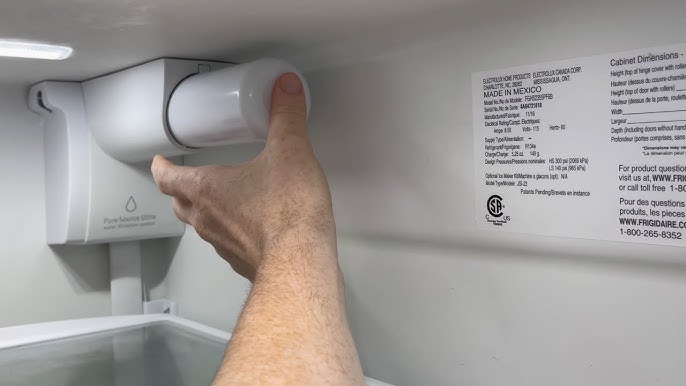
Is your Frigidaire Gallery water filter due for a change? Replacing it might sound tricky, but you can do it quickly and easily with the right steps.
Clean water means better taste and healthier drinks, so keeping your filter fresh is important. In this guide, you’ll find simple instructions that anyone can follow, no matter your experience. By the end, you’ll feel confident about changing your water filter yourself—and enjoying pure, crisp water every day.
Ready to get started? Let’s dive in.

Credit: glacierfreshfilter.com
Signs To Replace The Water Filter
Replacing the water filter in your Frigidaire Gallery fridge is important. It keeps your water clean and safe to drink.
Knowing when to change the filter helps keep your fridge working well. Watch for these signs.
Reduced Water Flow
If water comes out slower than usual, the filter may be clogged. A dirty filter blocks water flow.
Slow water flow means the filter cannot clean water properly. It is time to replace it.
Bad Taste Or Odor
Water with a strange taste or smell shows the filter is no longer working. Old filters trap less dirt.
Changing the filter helps keep your water fresh and free from unpleasant odors or flavors.
- Metallic taste
- Chlorine smell
- Musty or sour odor
Filter Change Indicator Light
Your fridge has a light that tells you when to change the filter. It often glows red or flashes.
When the light turns on, replace the filter soon to keep water clean and fridge working well.
Tools And Materials Needed
Replacing the water filter in your Frigidaire Gallery is important for clean water. You will need specific tools and materials.
Prepare to gather the right supplies before you start. This makes the process smooth and easy.
Compatible Replacement Filters
Using the correct replacement filter ensures your fridge works well. Check your fridge model to find the right filter.
- Frigidaire ULTRAWF
- Frigidaire WF3CB
- Frigidaire PureSource Ultra
Basic Tools
These basic tools help you replace the filter quickly. Having them ready saves time.
| Tool | Purpose |
| Clean Cloth | Wipe away spills |
| Bucket or Bowl | Catch excess water |
| Flashlight | See inside the fridge |
Locating The Water Filter
Knowing where the water filter is helps you change it easily. The Frigidaire Gallery water filter is in two common places.
Finding the filter allows you to keep your water clean and fresh. Let’s look at where to find it.
Inside The Refrigerator
The water filter is often inside the fridge. It is usually near the top right corner or bottom grille.
Look for a small cover or a round filter cartridge that you can twist out. Sometimes, it is behind the vegetable drawer.
- Open the fridge door fully
- Check top right corner or bottom grille
- Look behind the vegetable drawer if needed
- Find the round or rectangular filter cartridge
Under The Sink Option
Some Frigidaire Gallery models use a water filter under the sink. This filter connects directly to the water line.
Check under your kitchen sink for a small filter housing. It is usually attached to the cold water pipe.
- Open the cabinet under the sink
- Find the filter housing on the cold water line
- Look for a twist or snap-on filter cartridge
- Make sure the water supply is off before replacing

Credit: m.youtube.com
Removing The Old Filter
Replacing the water filter in your Frigidaire Gallery refrigerator keeps your water clean. Removing the old filter is the first step. Follow these simple actions to do it safely and correctly.
Make sure to handle the filter with care. This will help prevent leaks and damage to your refrigerator.
Turn Off Water Supply
Before you remove the filter, turn off the water supply. This stops water flow and prevents spills. You can do this by closing the shutoff valve under the sink or behind the refrigerator.
Release The Filter
Find the filter inside the fridge or at the base grille. To release it, push the release button or twist the filter counterclockwise. Gently pull the filter out to avoid water dripping.
- Locate the filter cover.
- Press the release button firmly.
- Turn the filter to the left.
- Pull the filter out slowly.
Dispose Of The Old Filter Properly
Used filters should not be thrown in regular trash. They may contain contaminants. Check local recycling rules for water filters to dispose of them safely.
| Disposal Method | Details |
| Recycling Program | Some stores accept used filters for recycling. |
| Household Hazardous Waste | Drop off at local hazardous waste centers. |
| Regular Trash | Avoid if possible to protect environment. |
Installing The New Filter
Replacing the water filter on your Frigidaire Gallery is simple. Installing the new filter correctly ensures clean water and proper function.
Follow these steps carefully to install the new filter without leaks or damage.
Prepare The New Filter
Remove the new filter from its packaging. Check for any protective caps or seals. Take off any covers before installation.
- Check the filter for damage
- Remove plastic caps or seals
- Do not touch the filter’s ends
Insert And Secure The Filter
Locate the filter housing in your refrigerator. Align the new filter with the housing. Push the filter in until it clicks or locks into place.
- Hold the filter firmly
- Insert it straight into the slot
- Turn or push until it locks
- Do not force it if it feels stuck
Turn On Water Supply
After installing the filter, turn the water supply back on. Check for leaks around the filter. Flush the water system by running water for a few minutes.
- Open the water valve slowly
- Watch for any leaks near the filter
- Run water from the dispenser for 3-5 minutes
- This clears air and old water from the system

Credit: wap.bhashaprofs.com
Flushing The New Filter
After replacing the water filter in your Frigidaire Gallery refrigerator, flushing the new filter is important. This process removes air and loose carbon particles from the filter. It helps make sure the water tastes clean and fresh.
Follow the steps below carefully to flush the filter correctly and avoid any issues.
Run Water For Several Minutes
Turn on the water dispenser and let the water run for about 3 to 5 minutes. This clears out any trapped air and debris inside the new filter. You might notice some sputtering or unusual tastes at first. This is normal and will stop after flushing.
- Place a large container under the water dispenser.
- Press the dispenser lever to start water flow.
- Keep water running for 3 to 5 minutes.
- Stop and check the water clarity and taste.
Check For Leaks
Inspect the filter area and water lines for any leaks. A proper installation will have no water dripping or pooling. If you find leaks, turn off the water supply and re-seat the filter firmly. Check the O-rings for damage or dirt.
| Leak Check Point | What to Do |
|---|---|
| Water dripping at filter base | Remove and re-install filter carefully |
| Wet spots near water lines | Inspect tubing connections and tighten |
| Continuous dripping | Replace damaged O-rings or call support |
Resetting The Filter Indicator Light
The filter indicator light on your Frigidaire Gallery fridge shows when to change the water filter. After replacing the filter, you must reset this light. This keeps your fridge working well and shows the right filter status.
This guide explains how to reset the filter light using the control panel or manual reset methods. Follow these simple steps to keep your fridge running smoothly.
Using The Control Panel
Most Frigidaire Gallery models have a control panel that lets you reset the filter light quickly. This method uses buttons on the fridge door. It is easy and fast.
Look for the “Filter Reset” or “Reset” button on the control panel. Press and hold it for about 3 seconds until the light turns off. This means the filter light has reset.
- Find the “Filter Reset” button on the control panel.
- Press and hold the button for 3 seconds.
- Wait for the filter light to turn off.
- Release the button once the light goes out.
Manual Reset Methods
If your fridge does not have a filter reset button, you can reset the light manually. This may involve pressing a combination of buttons or unplugging the fridge briefly.
One common way is to press and hold the “Water” and “Light” buttons together for 3 to 5 seconds. The filter light should turn off. Another way is to unplug the fridge for 5 minutes and plug it back in.
- Press and hold the “Water” and “Light” buttons for 3 to 5 seconds.
- Check if the filter light turns off.
- If not, unplug the fridge for 5 minutes.
- Plug the fridge back in and check the light again.
Troubleshooting Common Issues
Replacing the water filter on your Frigidaire Gallery should be simple. Sometimes, issues occur after replacement. This guide helps you fix common problems fast.
Check these tips if you face water leaks, indicator light errors, or poor water quality. Follow each section to get your filter working well again.
Water Leakage
Water leakage often happens if the filter is not installed right. Check for cracks or loose parts. Tighten the filter gently but firmly to stop leaks.
- Turn off water supply before replacing the filter.
- Remove the old filter and check the O-ring for damage.
- Replace the O-ring if it is cracked or worn out.
- Install the new filter by aligning it properly and twisting until secure.
- Turn on water and watch for leaks around the filter.
Indicator Light Not Resetting
The filter light may not reset if you skip the reset step or the control panel has an error. Reset the filter light to keep track of water filter life.
- Press and hold the reset button on the dispenser panel.
- Hold the button for about 3 seconds until the light blinks.
- Release the button once the light turns off.
- If the light stays on, unplug the refrigerator for one minute.
- Plug it back in and try the reset steps again.
Poor Water Quality
Bad water taste or smell can mean the filter is old or installed wrong. Make sure the filter is the correct model for your fridge.
| Issue | Cause | Solution |
| Cloudy water | Air trapped in filter | Run water for 5 minutes to clear air |
| Bad taste | Filter expired | Replace filter with new one |
| Low water flow | Clogged filter | Replace filter or check water line |
| Unusual smell | New filter needs flushing | Flush new filter by running water for 5 minutes |
Maintenance Tips For Longevity
Replacing the water filter in your Frigidaire Gallery keeps your water clean and fresh. Proper care helps the filter last longer and work well.
Follow simple maintenance tips to protect your water filter and your appliance. These tips ensure good water quality and reduce problems.
Regular Replacement Schedule
Change the water filter every six months. This keeps water clean and prevents clogs.
If you use a lot of water or notice bad taste, replace the filter sooner. Old filters can let dirt and germs through.
- Replace filter every 6 months
- Replace sooner if water tastes bad
- Follow your fridge manual for exact timing
Cleaning The Filter Housing
Clean the filter housing when you change the filter. Dirt and mold can build up inside.
Use a soft cloth and warm water to wipe the housing. Avoid harsh chemicals that can damage parts.
- Remove old filter carefully
- Wipe inside filter housing with cloth
- Use warm water, no strong cleaners
- Dry housing before installing new filter
Frequently Asked Questions
How Do I Know When To Replace My Frigidaire Filter?
Replace the filter every 6 months or when water flow slows. Some models have an indicator light to alert you. Regular replacement ensures clean, fresh water and optimal refrigerator performance.
Where Is The Water Filter Located In Frigidaire Gallery?
The filter is usually inside the fridge compartment, near the top right or bottom grille. Check your manual for exact location. Access it by twisting or sliding out gently.
Can I Use Any Water Filter For Frigidaire Gallery?
No, use only Frigidaire-approved filters for compatibility. Using the wrong filter can cause leaks or poor water quality. Always check model compatibility before purchase.
How Do I Properly Install A New Water Filter?
Align the new filter with the slot, then twist or push until it clicks. Flush water for 3-5 minutes to clear air and impurities. Follow your model’s specific instructions carefully.
Conclusion
Replacing the water filter on your Frigidaire Gallery is simple and quick. Regular changes keep your water clean and fresh. Follow the steps carefully to avoid mistakes. Clean water helps your family stay healthy every day. Don’t wait until the filter clogs.
Check it often and replace it on time. Enjoy better tasting water with little effort. Your fridge will work well for a long time. Easy care makes life better. Now, you know how to do it yourself.