

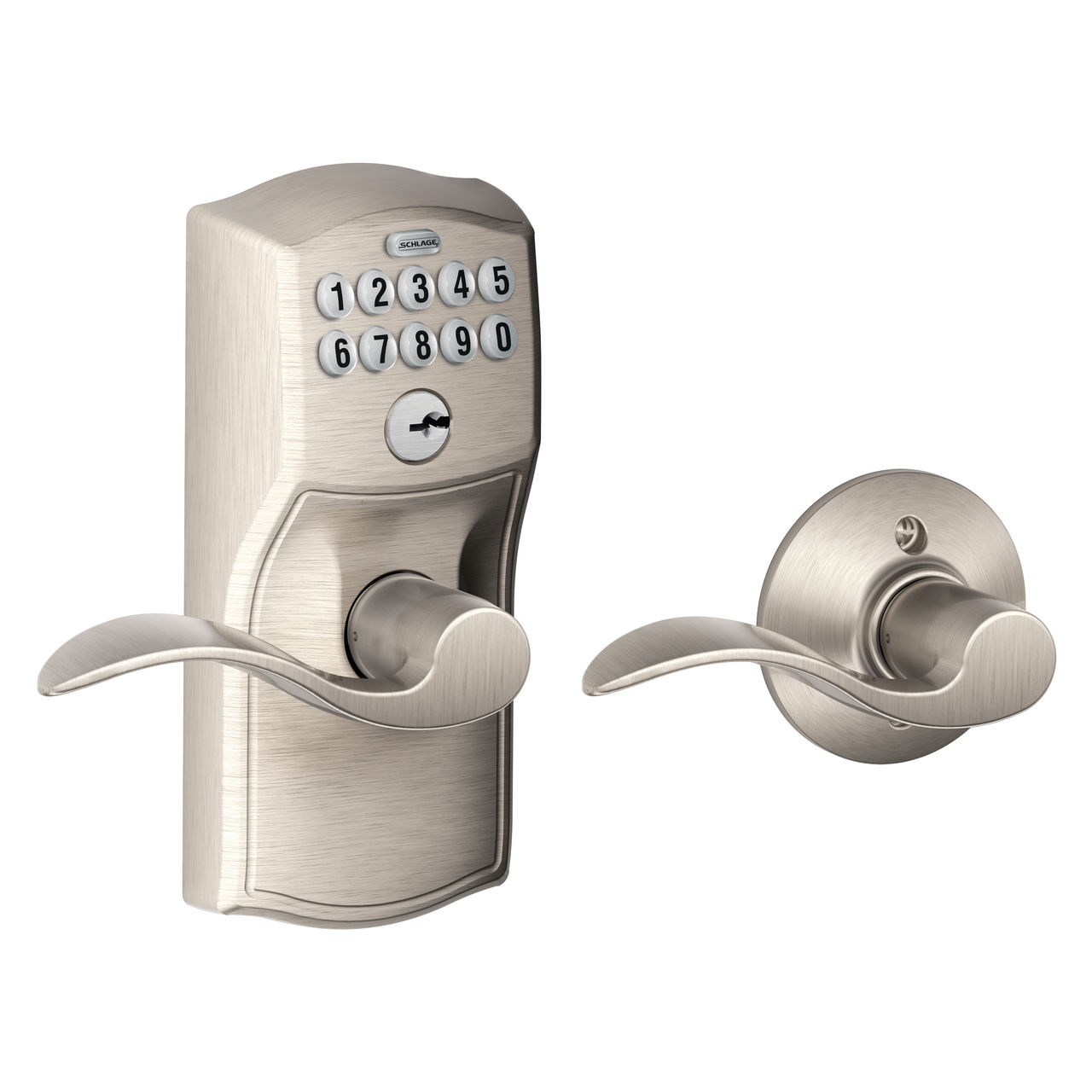
Changing the code on your Schlage keypad doesn’t have to be confusing or time-consuming. Whether you want to boost your home’s security or simply update your access code, this guide will walk you through every step clearly and quickly.
By the end, you’ll feel confident managing your lock without needing a locksmith. Keep reading—you’re just a few easy steps away from taking full control of your Schlage keypad.

Credit: www.youtube.com
Prepare For Code Change
Changing the code on your Schlage keypad requires careful preparation. This ensures the process goes smoothly and your lock stays secure.
Before you start, gather the right tools, find your programming code, and check the battery status of the lock.
Gather Required Tools
Having the correct tools makes changing the code easier and faster. You will need some basic items close at hand.
- Small flathead screwdriver
- Schlage keypad manual or quick start guide
- Pen and paper to write down codes
- New code ready for programming
Locate The Programming Code
The programming code is needed to enter programming mode on your lock. It is usually printed on a sticker inside the battery compartment.
Check Battery Status
Good battery power is essential to complete the code change without interruptions. Check the battery level before you begin.
| Battery Indicator | Meaning | Action Needed |
| Green Light | Batteries are good | Proceed with code change |
| Red Light | Batteries low | Replace batteries before starting |
| No Light | Battery dead or missing | Install new batteries immediately |
Access Programming Mode
Changing the code on your Schlage keypad starts with entering the programming mode. This mode lets you change settings, including your lock code.
To enter programming mode, you need the current programming code. This code is different from your user code and is usually set by the installer or factory default.
Enter Programming Code
First, wake up the keypad by pressing any button. Then enter the 6-digit programming code. After entering the code, press the Schlage button to confirm.
- Press any button to wake the keypad.
- Enter the 6-digit programming code.
- Press the Schlage button to confirm.
Confirm Entry
Once you press the Schlage button, the lock will beep and the light will flash. This confirms you are in programming mode and can change the code.
| Indicator | Meaning |
| Single beep and green light | Programming code accepted |
| Three beeps and red light | Programming code rejected |
| Light flashes for 5 seconds | Ready for new code entry |
Change The User Code
Changing the user code on your Schlage keypad keeps your lock secure. This guide shows how to update your code quickly.
Follow each section carefully to enter, confirm, and test your new code.
Enter New Code
Start by pressing the Schlage button on the keypad. Enter your current user code to access programming mode.
- Press the Schlage button.
- Enter your existing user code.
- Press the Schlage button again to confirm.
- Enter your new user code, usually 4 to 8 digits.
- Press the Schlage button to save the new code.
Confirm New Code
After entering your new code, you must confirm it to avoid mistakes.
| Action | What to Do |
| Re-enter Code | Type the new user code again exactly. |
| Press Schlage Button | Confirm the code by pressing the button. |
| Success Signal | Lock will beep or flash to show confirmation. |
Test New Code
Testing the new code ensures it works before you lock the door.
Try these tips to test your new code:
- Lock the door manually.
- Enter the new code on the keypad.
- Press the Schlage button to unlock.
- Make sure the door opens without errors.
- If it fails, repeat the code change steps.
Credit: www.schlage.com
Add Or Delete User Codes
Schlage keypad locks allow you to manage user codes easily. You can add new codes for family or guests.
Deleting old or unused codes helps keep your lock secure. This guide shows how to add and remove codes.
Add Additional Codes
To add a new user code, start by entering your programming code on the keypad. This code is usually found in the manual or on the lock.
- Press the Schlage button to wake the lock.
- Enter the 6-digit programming code.
- Press the Schlage button again.
- Enter a new 4-8 digit user code.
- Press the Schlage button to save the new code.
The lock will confirm the new code with a green light and a beep sound. You can add up to 30 user codes depending on your model.
Remove Existing Codes
Removing a user code is important when someone no longer needs access. Follow these steps to delete a code safely.
| Action | Description |
|---|---|
| Wake the lock | Press the Schlage button to activate the keypad. |
| Enter programming code | Type the 6-digit programming code and press the Schlage button. |
| Delete user code | Press 3 on the keypad, then enter the user code to delete. |
| Confirm deletion | Press the Schlage button to confirm. The lock will beep and flash red. |
Always test the lock after deleting a code to ensure it no longer works. Keep your programming code private for security.
Resetting The Lock
Resetting your Schlage keypad lock clears old codes. This allows you to start fresh. You can fix problems or set new codes after reset.
Follow the correct steps to avoid mistakes. The reset process is quick and easy when done right.
Factory Reset Process
The factory reset erases all user codes and returns settings to default. Use this if you forget your code or want to clear all data.
- Remove the lock’s battery cover.
- Press and hold the reset button inside the battery compartment.
- Hold the button until you hear a beep or the lock flashes.
- Release the reset button.
- Wait for the lock to complete the reset process.
- Replace the battery cover securely.
Reprogram After Reset
After resetting, you must add a new programming code and user codes. The default codes no longer work.
| Action | Description |
| Set Programming Code | Enter a new programming code for lock management. |
| Add User Codes | Input new user codes for daily access. |
| Test Codes | Verify all codes work before using the lock. |
Troubleshooting Tips
Changing a code on a Schlage keypad can sometimes be tricky. Knowing how to troubleshoot common issues is important.
Let's explore common errors and battery replacement advice to ensure your keypad works smoothly.
Common Errors
Sometimes the keypad may not respond or accept new codes. Here are some common errors and their solutions.
- Ensure the keypad is not locked or in programming mode.
- Check if the entered code is correct and within the code limit.
- Verify if the battery is properly connected and has power.
Battery Replacement Advice
Weak batteries can cause malfunction in your Schlage keypad. Here’s how to replace them effectively.
- Remove the keypad cover carefully.
- Take out the old batteries.
- Insert new batteries, ensuring correct polarity.
- Replace the cover securely.

Credit: www.youtube.com
Frequently Asked Questions
How Do I Reset The Schlage Keypad Code?
To reset the Schlage keypad code, press the Schlage button, enter the current code, then the programming code. Finally, enter a new user code and press the Schlage button again to save it.
Can I Change Multiple User Codes On Schlage Keypad?
Yes, you can change or add multiple user codes on a Schlage keypad. Use the programming code to manage each user code individually via the keypad.
What If I Forget The Schlage Programming Code?
If you forget the programming code, you must perform a factory reset on the lock. This resets all codes and restores default settings.
How Often Should I Change Schlage Keypad Codes?
It’s recommended to change your Schlage keypad codes every 3 to 6 months. Regular updates improve your lock’s security.
Conclusion
Changing the code on a Schlage keypad is simple and quick. You only need a few steps to keep your lock secure. Remember to write down your new code in a safe place. Test the new code before locking the door.
This way, you avoid any troubles later. Regularly changing your code helps protect your home. Stay safe by updating your keypad code often. Now, you can easily manage your lock with confidence.